I reformat using the same filesystem my external hard drive uses. Then set UID to 1000 in the System Preferences > Accounts > Advanced Options (right click on username). After that chown whole home directory.
Showing posts with label unix. Show all posts
Showing posts with label unix. Show all posts
11.18.2008

5.23.2008
PHP and Leopard Server : mach-o, but wrong architecture
May 22 19:33:34 amanyus org.apache.httpd[96895]: httpd: Syntax error on line 143 of /private/etc/apache2/httpd.conf: Cannot load /usr/libexec/apache2/libphp5.so into server: dlopen(/usr/libexec/apache2/libphp5.so, 10): no suitable image found. Did find:\n\t/usr/libexec/apache2/libphp5.so: mach-o, but wrong architecture

May 22 19:33:34 amanyus com.apple.launchd[1] (org.apache.httpd[96895]): Exited with exit code: 1

May 22 19:33:34 amanyus com.apple.launchd[1] (org.apache.httpd): Throttling respawn: Will start in 10 seconds
Insert installation disc. Open up terminal.
$ cd /Volumes/Mac\ OS\ X\ Server\ Install\ Disc/System/Installation/Packages/

$ open .
Run Essentials.pkg and install it to an empty filesystem or empty folder. the libphp.so will be inside [install_dir]/usr/libexec/apache2 directory.
5.16.2008
It intrigues people when...
 May 16 15:13:59 amanyus ReportCrash[6560]: Formulating crash report for process Finder[226]

May 16 15:13:59 amanyus com.apple.launchd[207] ([0x0-0xb00b].com.apple.finder[226]): Exited abnormally: Segmentation fault

May 16 15:14:02 amanyus mDNSResponder[30]: SetupAddr invalid sa_family 0

May 16 15:14:03: --- last message repeated 1 time ---

May 16 15:14:03 amanyus ReportCrash[6560]: Saved crashreport to /Users/amanyus/Library/Logs/CrashReporter/Finder_2008-05-16-151352_amanyus.crash using uid: 1000 gid: 20, euid: 1000 egid: 20
...because it is rare. At least it didn't take any other application down. Just auto-relaunch Finder.
5.15.2008
Spotlight Doesn't Search a Thing
Open Terminal application (Application > Utilities > Terminal) and run this command:
This command will turn on indexing on all volumes except impossible volumes such as DVD volumes and unsupported filesystems volumes. mdutil command is a command to manage the metadata stores used by Spotlight. Every volumes are separated-ly managed. Means for example you can turn on indexing on /home only instead of all volumes.
You can check the status first before simply turning on by running this command:
There is a good side for enabling indexing on few Volumes. It will narrow down search with the area that we want. Definitely we don't have to go through / to search documents in /Volumes/ExternalDisk.
PS: Volumes is not mount points. Volumes can be seen on your desktop. The hard disk icon, Macintosh HD is a volume.
Once you turn on indexing, you can see a slow blinking dot at the spotlight button at the top right corner of your Mac.
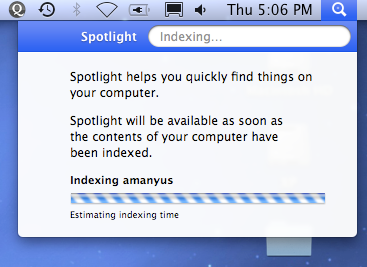
sudo mdutil -a -iThis command will turn on indexing on all volumes except impossible volumes such as DVD volumes and unsupported filesystems volumes. mdutil command is a command to manage the metadata stores used by Spotlight. Every volumes are separated-ly managed. Means for example you can turn on indexing on /home only instead of all volumes.
You can check the status first before simply turning on by running this command:
sudo mdutil -a -sThere is a good side for enabling indexing on few Volumes. It will narrow down search with the area that we want. Definitely we don't have to go through / to search documents in /Volumes/ExternalDisk.
PS: Volumes is not mount points. Volumes can be seen on your desktop. The hard disk icon, Macintosh HD is a volume.
Once you turn on indexing, you can see a slow blinking dot at the spotlight button at the top right corner of your Mac.

Subscribe to:
Posts (Atom)